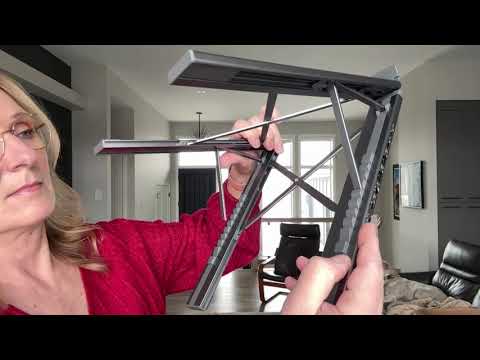
This stand docking station is worth buying if you’re tired of plugging and unplugging HDMI, USB, and charger cables every time you sit down. It’s an 8-in-1 USB-C hub that also lifts your laptop into a stand, with 4K HDMI, 100W power delivery, and card slots built in. Buy it if your laptop supports USB-C video output.
This post contains affiliate links. I may earn a commission at no extra cost to you.
How this review was made: written from my own video review of this product. Every opinion here is my own, from using it myself.
| Ports | 8-in-1: HDMI, USB-A, USB-C 3.0, SD/TF card, audio jack |
|---|---|
| Display Output | 4K @ 30Hz HDMI, 3840×2160 |
| Power Delivery | 100W total (85W laptop / 15W peripherals) |
| Weight | 0.9 lbs |
| Folded Size | 10.5 x 2.2 x 0.9 in |
| Height Adjustment | 9-level |
My Desk Was a Cable Disaster Before This
Before this, sitting down to work meant plugging in HDMI, then the USB-A for my mouse, then the charger, three separate cables every single time, often in the wrong order. This stand docking station collapsed that into one USB-C connection. The other seven cables now live permanently in the hub.
I didn’t expect to use it as much as I have. It’s become the thing I plug my laptop into first, before I even open my email.
Zero Maintenance, Zero Ongoing Cost
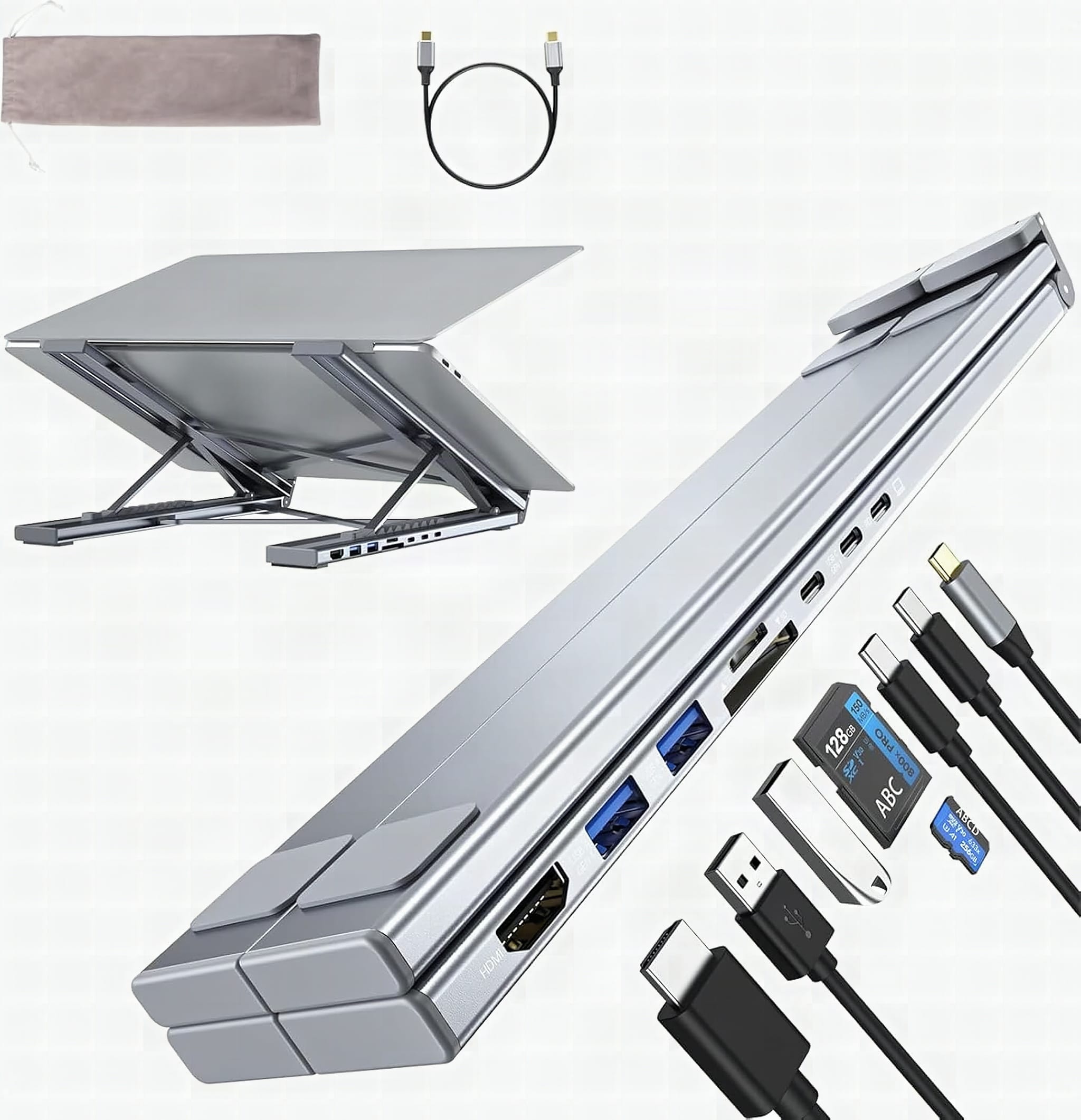
There’s no consumable, no filter, no battery to replace. It’s a passive hub, so ownership cost after the purchase is basically zero. The one thing worth knowing is it folds down to 10.5 x 2.2 x 0.9 inches and comes with a storage bag, so if you travel with it, it packs flat instead of rattling around loose in a backpack.
This One Lifts Your Screen, Most Hubs Don’t
Most of the cheap USB-C hubs on Amazon just sit flat on the desk and dangle off the side. What separates this from a flat dongle is that it tilts the screen up on a 9-level riser, I landed on level 5 and stopped craning my neck forward during Zoom calls almost immediately. That’s the differentiator against a plain dongle-style hub, you’re buying a riser and a port expander in the same footprint.
Amazon currently has it sitting around #664 in Computers & Accessories, down a bit from its 90-day average of #560, but it’s still moving more than 500 units a month. That’s not a runaway bestseller, it’s a steady niche pick for people specifically solving the cable clutter problem, not an impulse buy.
The 8 Ports: 4K HDMI, 100W Power Delivery, Card Slots
You’ve got 4K HDMI, multiple USB ports, SD and microSD card slots, an audio jack, and 100W power delivery so your laptop charges while you use it, which is amazing. HDMI output runs at 3840×2160 resolution at 30Hz, and the listing is specific that your laptop’s USB-C port needs to support DisplayPort Alt Mode, meaning USB 3.2 Gen2, USB 4, or Thunderbolt 3/4/5, for the video to actually work. The 100W breaks down as 85W reserved for charging your laptop and 15W for whatever’s plugged into the hub itself, and the brand notes only one external hard drive should be connected at a time if you want a stable connection.
For my own use, that’s Zoom calls, video editing, and just watching stuff, and it’s way more easier to watch with the screen lifted to eye level instead of hunched over a laptop on a flat desk.
Check Your Laptop’s USB-C Port Before You Order
The compatibility list covers MacBook Pro and Air going back to 2016, Mac models with M1 through M5 chips, Dell XPS, HP, ASUS, Lenovo ThinkPad, Chromebooks, and Surface devices from 10 to 17 inches. But that compatibility only holds if the USB-C port on your specific machine supports video output, older or budget laptops sometimes have a USB-C port that only charges and doesn’t carry a display signal. Check that before you order, because the hub can’t fix a port that doesn’t support DisplayPort Alt Mode.
If your USB-C port supports DisplayPort Alt Mode, buy it, one cable replaces eight and your screen sits at eye level. If you’re not sure, look up your laptop’s spec sheet first, because a blank external monitor is a frustrating way to discover you have a charge-only port.
Pros
- Replaced 8 separate cables with one connection point
- Lifts the screen to a better eye level with a 9-level riser
- 100W power delivery charges the laptop while the hub is in use
- Folds down to a compact 10.5 x 2.2 x 0.9 inches with a carrying bag
- 4K HDMI output made editing and Zoom calls noticeably easier to view
Cons
- HDMI functionality depends entirely on your laptop’s USB-C port supporting DisplayPort Alt Mode, not all do
- The 15W reserved for peripherals is tight if you’re running more than one powered accessory
- Only one external hard drive is supported for a stable connection
Frequently Asked Questions
Does this stand docking station need drivers or software to work?
No, it’s plug-and-play. There’s no app or driver install, you just connect the USB-C cable and the ports activate.
Can I use this with a gaming laptop or does it only work for office tasks?
It’ll work for general use like editing, Zoom, and video, but it’s built around a 100W power budget split between charging and peripherals, so it’s not built for high-draw gaming peripherals running simultaneously.
Will this work with a Windows laptop or is it Mac-only?
It’s compatible with both. The listing covers Dell XPS, HP, ASUS, Lenovo ThinkPad, Acer, Chromebook, and Surface devices alongside MacBook models, as long as the laptop’s USB-C port supports video output.
What’s the warranty on this docking station?
Specific warranty terms weren’t part of what I tested, so check the current listing page for the exact coverage before you buy.
Get it now
8-in-1 USB-C Stand Docking Station
Check the current price on Amazon →Affiliate link. See the disclosure at the top of this post.

🛍️ Shop everything in this video
Every product mentioned, in one place. These are affiliate links, so I may earn a small commission at no extra cost to you.
🛍️ 8-in-1 USB-C Laptop Stand with Docking Station: check price on Amazon →