This post contains affiliate links. I may earn a commission at no extra cost to you.
This post contains affiliate links. I may earn a commission at no extra cost to you.
The Apolosign 21.5-inch Digital Calendar sits on my wall right now, and the main reason I picked it up is the one that will probably sound familiar: a part line full of sticky notes, a whiteboard with half-erased chore lists, and three different family members checking three different apps that never quite matched. This is not an impulse buy, so I want to walk you through exactly what it does, what the trade-offs are, and who I think will get the most out of it.
The Problem It Actually Solves
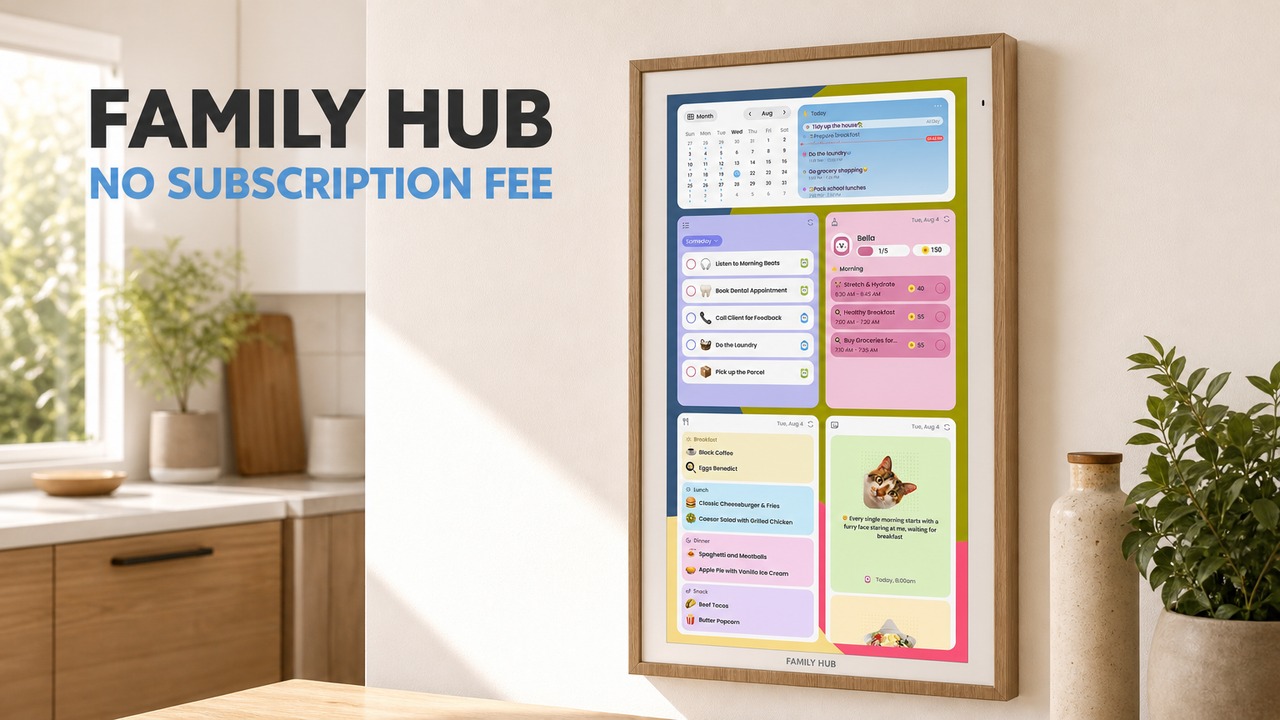
Most families do not have a scheduling problem. They have a visibility problem. Everyone knows their own week, but nobody knows the whole household week at a glance. The Apolosign 21.5-inch Digital Calendar is designed around that specific gap. Mount it in a central spot, sync the calendars your family already uses, and the whole week is visible to anyone who walks past. That is the pitch, and it is a reasonable one.
The screen is 21.5 inches with a 1920×1080 full HD resolution and an anti-glare matte finish. In a bright kitchen or hallway, that anti-glare coating does real work. I have had standard glass screens wash out completely in afternoon light, and this one holds up noticeably better. Auto-brightness adjustment keeps the display comfortable whether you are checking it at noon or in the middle of the night when the kitchen light is off.
Setup: Wall Mount Only, Plan Ahead
One thing worth knowing before you order: the 21.5-inch size comes with a wall mount bracket and no desktop stand option. That is a real constraint if you were imagining it sitting on a counter. You are committing to a wall installation, so pick your spot carefully. The unit weighs 12.87 pounds and measures 13.35 inches wide by 21.56 inches tall, so it has a solid presence without being overwhelming in a standard kitchen or mudroom wall space.
Once it is up, setup is familiar if you have ever configured an Android device. The Apolosign runs Android 15 on a Rockchip octa-core processor with 4 GB of RAM and 64 GB of storage. Connecting to Wi-Fi, signing into Google, and syncing Google Calendar took only a few minutes. Outlook and iCloud sync are also supported, which matters for households where partners use different ecosystems. That cross-platform calendar pull is one of the features I appreciate most, because it means I do not have to ask anyone to switch apps.
Dual Mode: Calendar View vs. Android Mode
The Apolosign has two distinct modes and switching between them is a single touch. Calendar Mode keeps the display clean and focused, showing your schedule, chores, weather, and whatever widgets you have set up. It is the mode that makes sense for a family wall display, and it is where the screen will live most of the time.
Android Mode opens up the full Android 15 experience. You can download additional apps from Google Play, rearrange widgets, and essentially turn the display into a large shared tablet on your wall. I find this genuinely useful for adding a grocery app or a music player without leaving the wall. The dual mode design means you are not locked into whatever the manufacturer decided the interface should look like. So if your family’s routine changes, the screen can change with it.
Chore Charts, Meal Planning, and the Family App
The built-in chore chart and rewards system is where this product separates itself from a standard smart display. Through the Apolosign Calendar App, you can assign tasks to specific family members, set up a rewards structure for completed chores, and track habits over time. For families with kids, the visual accountability of a shared screen is a different experience from an app buried on a phone. When the chore list is on the wall for everyone to see, the dynamic shifts.
Meal planning and grocery lists live in the same app. You can build a weekly meal plan, attach a shopping list, and have it visible in the same place as the schedule. I do not want to overstate how transformative any single app feature is, but having meal planning and scheduling in one shared physical space rather than bouncing between three apps on three phones is a real quality-of-life improvement for a busy household.
Google Gemini Voice Assistant and Smart Home Control
Four built-in microphones power the Google Gemini voice assistant. You can ask it to check the schedule, set a reminder, pull up weather, or control compatible smart home devices through Google Home. If you already have smart lights, a video doorbell, or cameras connected to Google Home, those controls are accessible directly from this screen.
I will be straightforward: the voice assistant works as well as Google Gemini works on any Android device, which is to say it is capable and occasionally imperfect, just like every voice assistant. The four-microphone array means it picks up voice commands reasonably well from across a room, which matters when your hands are full in the kitchen. The smart home integration is a genuine bonus rather than a core feature for most families, but if you are already in the Google ecosystem, it adds real convenience.
Photo Slideshow and Display Quality
When the calendar is not actively in use, it can display a photo slideshow from Google Photos. Sleep mode kicks in on a schedule so the screen is not glowing all night. The anti-glare HD touchscreen with auto-brightness means the display adapts to the room rather than demanding the room adapt to it. As a family memory display between schedule checks, it is a genuinely nice touch. The Teak color variant has a warm, wood-toned finish that sits more comfortably in a home environment than a stark black frame would.
No Subscription: What That Actually Means
The no-subscription model is highlighted prominently, and it is worth unpacking. The core features, including the family calendar, chore charts, rewards system, to-do lists, and photo screensaver, are available for lifetime use with no monthly fee. That is a meaningful differentiator from competitors that charge ongoing subscription costs just to use the basic functionality of a device you already purchased. Knowing there is no additional monthly bill removes a real source of long-term frustration.
The 1-year manufacturer warranty and ongoing OS updates are also included. Android 15 is current as of this writing, and ongoing update support suggests the device is not going to be abandoned on an outdated OS quickly.
Who This Is For, and Who Should Wait
The Apolosign 21.5-inch Digital Calendar makes the most sense for households with two or more people who are genuinely trying to coordinate schedules across different calendar apps. If you have kids with activities, chores to track, and a shared meal plan to manage, the combination of features on one screen at one price with no recurring fees is a strong value proposition.
If you live alone, or if your household already runs smoothly on a single shared app, this is probably more screen than you need. And if you were hoping for a countertop option, the wall-mount-only format for this size is a real constraint to weigh before purchasing.
Check the current price to see if it fits your budget. I would not describe it as overpriced for what it does, but it is a considered purchase rather than a casual one. Worth comparing against smaller or simpler smart displays if your use case is more limited.
For the full listing details, the product is sold as the Apolosign 21.5-inch Digital Calendar, No-Subscription, Smart Wall Planner with Calendar Sync, Chore Chart, Meal, Apps & Dashboard, Electronic Touchscreen Display for Family Schedules, Dual Mode (Teak).
Bottom Line
I own this and I use it. The combination of cross-platform calendar sync, a no-subscription model, an actual chore and rewards system, and a full Android mode in one wall-mounted screen is a sensible package for a family that is tired of coordinating across too many apps. The anti-glare display holds up well in bright rooms, the Google Gemini voice assistant adds hands-free convenience, and the dual mode design keeps the interface flexible as your household’s needs change. If centralizing your family’s schedule onto one visible shared screen sounds like it would solve a real problem in your house, this is worth a serious look.
👍 Pros
- No monthly subscription: core family calendar, chore charts, rewards, and photo screensaver are free for lifetime use
- Cross-platform calendar sync covers Google Calendar, Outlook, and iCloud in one place
- 21.5-inch anti-glare HD touchscreen with auto-brightness holds up well in bright rooms
- Dual mode lets you keep a clean family calendar view or switch to a full Android 15 experience
- Built-in Google Gemini voice assistant with four microphones supports hands-free control and smart home integration
👎 Cons
- Wall-mount only at this size, no desktop stand option included
- At check the current price, it is a significant upfront investment for families on a tighter budget
- 12.87 lbs and portrait orientation require a committed, well-chosen wall installation spot
👉 A well-specified, no-subscription family command center that earns its price if your household is genuinely juggling multiple calendars, chores, and schedules on one shared wall.
Frequently asked questions
Does the Apolosign 21.5-inch Digital Calendar require a monthly subscription?
No. The core features, including the family calendar, chore charts, rewards system, to-do lists, and photo screensaver, are available for lifetime use with no monthly fees. You pay once at purchase and the essential tools remain available without any recurring cost.
Which calendar apps does the Apolosign sync with?
The Apolosign 21.5-inch Digital Calendar supports automatic synchronization with Google Calendar, Outlook, and iCloud. That covers the three most common household calendar ecosystems, so families using different platforms can still see everything in one place.
Can you mount the Apolosign 21.5-inch Digital Calendar on a countertop or desk?
The 21.5-inch model comes with a wall mount bracket and does not include a desktop stand. You will need to plan for a wall installation before purchasing. Make sure you have a suitable wall location in a central household area before ordering.
What Android version does the Apolosign run, and will it receive updates?
The device runs Android 15 and the manufacturer includes ongoing OS updates and support. It also carries a 1-year manufacturer warranty. Running a current Android version means access to Google Play apps and the Google Gemini voice assistant out of the box.
Is the Apolosign 21.5-inch Digital Calendar good for families with young kids?
It is designed with families in mind. The interactive chore chart includes a reward-based tracking system to help kids complete tasks and build habits, displayed visibly on a shared screen. Meal planning, grocery lists, and shared schedules are all managed through the Apolosign Calendar App in one place.