This post contains affiliate links. I may earn a commission at no extra cost to you.
Your Kid Can’t Find Asia on a Map, and a Wall Poster Won’t Fix It
Here’s the problem most parents run into. A static wall map gets ignored within a week. A spinning desk globe collects dust. And handing a five-year-old a tablet “to learn geography” usually ends in cartoons. That gap, between wanting screen time to mean something and watching it turn into zombie mode, is exactly what the PlayShifu Orboot Earth Explorer was built to close.
The idea is simple. It’s a 10-inch smart globe that pairs with a free companion app. Point a phone or tablet camera at the globe and animals, monuments, inventions, and cultures pop up in augmented reality on the screen. The physical object gives the screen a job to do. That’s the whole pitch, and it’s a good one. But there’s a catch worth understanding before you buy, and this guide walks through all of it.
Quick Verdict
The Orboot Earth Explorer nails content depth with 400+ wonders and a genuine constellation light-up feature that needs no device. The catch: the globe itself is blank, no country labels, so it’s an AR toy first and a reference globe never.
Buy if you:
- Want screen time tied to a physical object with a clear learning purpose
- Have a kid roughly second grade and up who loves quizzes and scavenger hunts
- Own a reasonably recent tablet or phone for the AR camera
- Want an indoor way to teach 60+ constellations without going outside at night
Skip if you:
- Want a labeled globe for homework, the surface is blank without the app
- Only have an older or low-end device, scanning can freeze or fail to recognize the globe
- Are buying for a 4-year-old expecting instant independent play, precise camera aiming is tricky for little hands
What’s in the Box and What It Actually Does
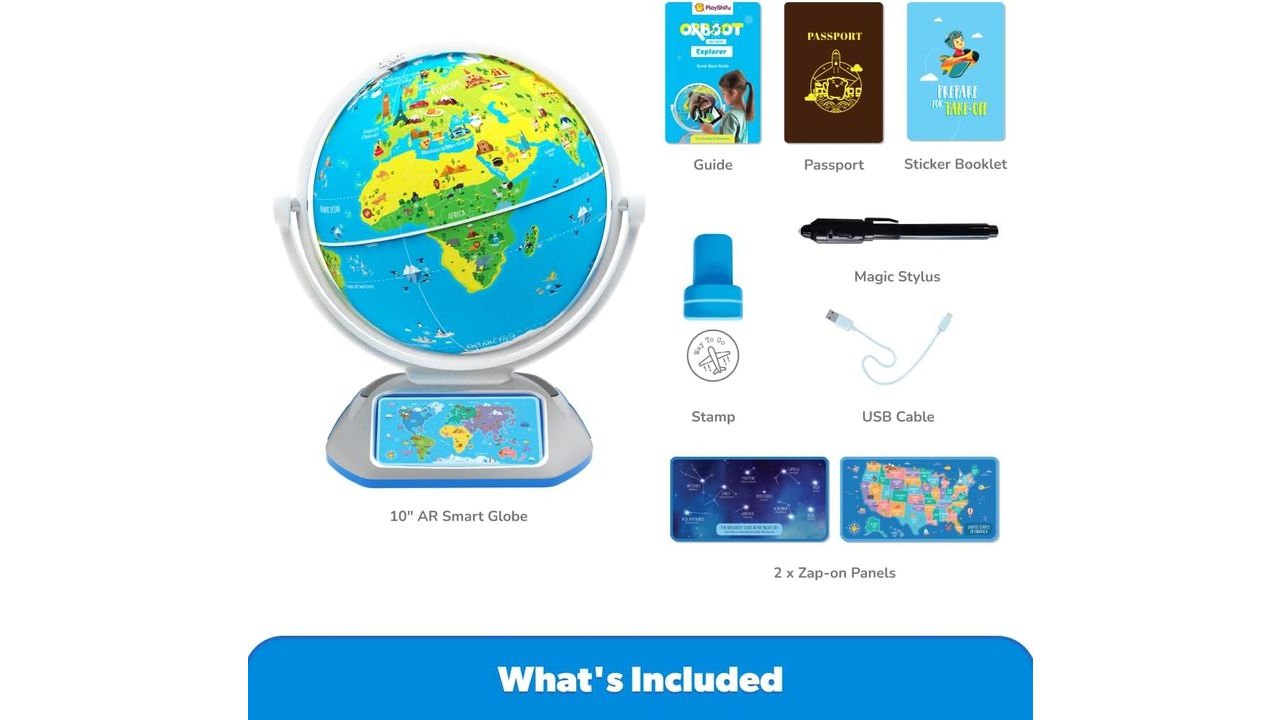
The kit is more generous than a plain globe. Inside you get the 10-inch smart globe, 2 Zap-on panels, a magic stylus with a built-in black light, a passport, a stamp, a sticker book, a USB cable, and a quick start guide. The device to run the app is not included, that’s on you.
| Spec | Detail |
|---|---|
| Globe size | 10 inch smart globe |
| Recommended age | 4+ (practically best from 2nd grade up) |
| Content | 400+ wonders, 1,000+ facts (per listing) |
| Constellation mode | 60+ constellations, no app required |
| In the box | Globe, 2 Zap-on panels, magic stylus, passport, stamp, sticker book, USB cable, guide |
| App cost | Free, no subscription, no third-party ads |
| Device | Not included; phone or tablet needed for AR |
Features Translated Into What They Mean for Your Kid
The AR scanning is the headline. Aim the camera at a region and the app layers animals, landmarks, cuisines, inventions, and cultures over the globe on screen. That breadth is the real draw. A single picture book can’t cover animals plus monuments plus inventions plus food across every continent, but the app tries to, and mostly succeeds on content volume.
Constellation mode is the sleeper feature. Flip the dual-light switch on the globe and 60+ constellations light up right on the sphere. No app, no camera, no device required. That matters because teaching a young kid about the night sky normally means dragging them outside after bedtime. Here it happens on the coffee table at 3pm. It’s the one piece of the product that works fully on its own.
The magic stylus writes invisible ink that only shows under the black light. Sounds like a gimmick, and for some kids it is. For others it becomes the reason they keep coming back. Then there are the games, quizzes, scavenger hunts, and ecosystem-balancing activities, all designed to make kids interact rather than passively watch. That’s the antidote to the flashcard-level “edutainment” most geography content settles for.
How the AR Holds Up in Real Living Rooms
The AR is impressive when it works, and inconsistent when your device is older. The app has to recognize small markers on the globe through the camera, and that recognition depends heavily on your hardware and lighting. On a newer tablet in a well-lit room, it clicks along fine. On older devices, reports include the app loading but never recognizing the icons through the lens, and freezing during play.
Lighting is the other variable. Scanning indoors in dim conditions is frustrating for anyone, and doubly so for a small child who has to hold the camera steady and aimed precisely at tiny markers. A five-year-old’s aim wanders. That’s not a defect so much as a reality of how camera-based AR works, but it’s worth setting expectations before you unwrap it on a birthday morning.
One reassuring detail: the app is free, carries no subscription, and shows no third-party advertising. Scanning doesn’t require Bluetooth either. So once you’re past the device hurdle, there’s no paywall waiting to spring on you later. That alone separates it from a lot of “free app, paid everything” toys.
The Blank Globe Is the Thing to Understand First
The physical globe has no country labels, borders, or names printed on it. Without the app, it’s a decorative blue ball. If you pictured a traditional labeled globe that also happens to do AR, this isn’t that. Buyers who wanted a homework-and-reference globe plus a digital layer have called this a dealbreaker, and that’s a fair reaction.
A couple of other friction points show up in buyer feedback. App syncing bugs surface periodically, with the standard fix being an uninstall and reinstall, which is annoying mid-play. Content accuracy has also been questioned in at least one spot, where the Russia adventure section reportedly labels Igor Sikorsky as Russian rather than Ukrainian. For parents who care about factual precision, that’s a small but real flag. And the app’s own store rating sits around 3.98 from roughly 2,900 ratings, noticeably below the toy’s 4.4 on Amazon, a sign the app is the weaker half of the experience.
Get it now
PlayShifu Orboot Earth Explorer – Interactive AR Globe for Kids Ages 4+ | 400+ Wonders, 1000+ Facts | Constellation Mode, Games & Magic Stylus | Educational STEM Toy for Future Scientists
Get the best price on Amazon →This post contains affiliate links. I may earn a commission at no extra cost to you.
Who This Globe Actually Fits
The sweet spot is a curious kid from around second grade up, in a household with a reasonably recent tablet. Reviewer consensus lands there: it works from kindergarten, but really clicks from second grade onward, and adults poking at it tend to enjoy the content too. A four-year-old can use it, but expect a parent hovering to help aim the camera and steady the scan.
It also suits multi-age households well. Siblings across a wide age range can share the globe or take turns on the app, which cuts down on buying separate toys for separate ages. If the household goal is turning aimless screen time into something with a point, this fits that brief cleanly. If the goal is a labeled reference globe for school projects, look elsewhere.
Orboot vs LeapFrog vs Talking-Pen Globes
The Orboot wins on content depth and hardware, loses on standalone reliability. Here’s the lay of the land against the two most common alternatives shoppers cross-compare at this tier.
| Orboot Earth Explorer | LeapFrog LeapGlobe | Talking-Pen Globe | |
|---|---|---|---|
| AR / app | Full AR | Basic touch | Smart pen only |
| Physical labels | None | Labeled | Labeled |
| Constellation mode | Yes, built-in | No | No |
| App dependency | High | Low | Low |
| Best age | 4+ (best 6+) | 3+ | 6, 12 |
If device-free reliability and printed labels matter most, the LeapFrog LeapGlobe or a talking-pen globe like Little Experimenter’s 9-inch model are the safer picks for younger or device-light homes. The Orboot pulls ahead when content breadth and the constellation feature are the priorities, and when you already own a capable tablet.
Smart Ways to Buy and Set It Up
Try the app before you commit. The Orboot app can be downloaded and used for free without the physical globe, so you can test whether it runs smoothly on your specific tablet before spending a cent. That single step sidesteps the biggest complaint, buying it only to discover your device chokes on the AR.
Set it up somewhere bright. Poor lighting is the number one scan killer, so a well-lit table beats a dim bedroom floor. Charge or update the tablet first, since the app was last updated April 27, 2026, and staying current reduces freezing. And frame expectations for younger kids: the first few sessions may need a parent to help aim the camera before it becomes independent play.
Pros
- Deep content library, 400+ wonders and 1,000+ facts spanning animals, monuments, inventions, cultures, and cuisines
- Constellation mode with 60+ constellations works with no app or device needed
- Free app with no subscription and no third-party advertising
- Generous box: magic stylus with black light, passport, stamp, sticker book, and Zap-on panels
- Turns screen time into interactive learning through quizzes, quests, and scavenger hunts
Cons
- Globe is blank with no printed labels, useless as a standalone reference tool
- AR scanning is unreliable on older or low-end devices and in poor lighting
- Precise camera aiming is difficult for very young kids
- App syncing bugs occur, often fixed only by uninstall and reinstall
- App store rating (~3.98) trails the Amazon product rating (4.4)
What we’d improve
Three fixes that would sharpen the next version:
- Add faint printed labels, even subtle continent or country outlines on the globe would rescue it as a reference tool without hurting the AR markers.
- Tighten app stability, the sync bug that forces a reinstall is the kind of friction that turns birthday excitement into a support ticket.
- Fact-check regional content, flagged errors like the Sikorsky nationality mix-up undercut trust for accuracy-minded parents.
Frequently Asked Questions
Does it need a tablet or phone to work at all?
Mostly yes. The AR features, animals, monuments, quizzes, and games, all require a phone or tablet running the free app. The one exception is constellation mode, which lights 60+ constellations directly on the globe using a switch, no device needed.
Does the app work on Amazon Fire tablets?
It can load on Fire tablets, but performance varies. Some users on Fire tablets, along with older iPads and certain Android phones, reported the app loading but failing to recognize the globe through the camera. A fairly recent, capable device is your safest bet, and testing the free app first is smart.
Is there a subscription fee?
No. The companion app is free with no subscription and no third-party advertising. Once you own the globe, the digital content doesn’t sit behind a paywall.
What’s the best age for it?
Officially 4+, but practically it shines from around second grade up. A four-year-old can use it with parental help aiming the camera, while older kids get more from the quizzes and quests. Adults tend to find the content interesting too.
Does the physical globe have country labels?
No. The globe is blank with no printed country names or borders. All the geographic information lives in the app, so it won’t serve as a traditional reference or homework globe.
Can the app be used without the globe?
Yes, the Orboot app can be downloaded and used for free without the physical globe. That’s handy both for trialing it before you buy and for keeping some content available if the globe is ever lost or damaged.
How does it compare to a LeapFrog globe?
The Orboot offers far deeper content and full AR plus a constellation feature LeapFrog lacks. The LeapFrog LeapGlobe wins on being labeled, lower app dependency, and reliability for younger kids around age 3. Pick based on whether content depth or device-free simplicity matters more.
Is the magic stylus actually used, or just a gimmick?
It depends on the child. The stylus writes invisible ink visible only under its black light, which some kids adore and return to often, while others try it once and move on. It’s a bonus feature, not the main reason to buy.
How long does setup take from unboxing to playing?
Fairly quick once the app is installed and updated. The main variables are downloading the app on a capable device and finding good lighting for the first scan. Younger kids may need a parent for the first couple of sessions until aiming the camera becomes second nature.
Get it now
PlayShifu Orboot Earth Explorer
Get the best price on Amazon →This post contains affiliate links. I may earn a commission at no extra cost to you.